Product Catalog API
Summary
-
API Specification
2.1 Authentication
2.2 Pagination
2.3 Product Properties
2.4 Product Option Properties
2.5 Base URL of the endpoints
2.6 Required Endpoints -
Examples
3.1 Retrieve all products
3.2 Search for products
3.3 Retrieve product options
3.4 Mark a product as customizable
3.5 Mark a product as no longer customizable
1. Overview
The Product Catalog API is an interface that must be implemented on the system on which you want to integrate Zakeke, to allow Zakeke to obtain the list of products present on that system and to transform a product into a customizable product.
You can implement this API using any technology stack. You can read here a basic implementation of it in php.
2. API Specification
The purpose of the Product Catalog API is to allow the Zakeke back office to show you the list of products available on your store to let you choose which of these to make customizable/configurable. To do this, Zakeke must be able to ask the store for the list of available products and must be able to indicate whether a product is enabled for customization/configuration or not.
Each product in your system can contain one or multiple variants (some ecommerce platforms would call these options) that the customer can purchase (imagine multiple sizes or colors of the same t-shirt). To enable the customization of individual variants (options), Zakeke must be able to retrieve the information relating to them via API call.
2.1 Authentication
We require that every API call from Zakeke to the store be authenticated and authorized. Each request is authenticated by HTTP Basic Authentication by using using your Zakeke api client id as username and your secret key as password. You can find your api keys from this page.
2.2 Pagination
API calls that return a list of resources must support result pagination by a parameter named page in the query string. The first page must have index 1. The API must return an empty list when the requested page doesn't have any elements.
2.3 Product Properties
For each product, Zakeke requires the following properties:
| Property | Description |
|---|---|
code | A unique numeric identifier for the product. Each id is unique across your system. |
name | The name of the product. |
thumbnail | The URL of an image associated with the product. |
Below is an example of JSON representing an ecommerce product as requested by Zakeke.
{
   "code": "242422342",
   "name": "Woman handbag",
   "thumbnail": "https://urlOfTheproduct"
}
2.4 Product Option Properties
For each product option, Zakeke requires the following properties:
| Property | Description |
|---|---|
code | The unique numeric identifier for the product option. |
name | The name of the product option. |
values | The list of possible values of the product option. |
For each of the possible option value, Zakeke requires the following properties:
| Property | Description |
|---|---|
code | The unique numeric identifier for the option value. |
name | The name of the option value. |
Below is an example JSON of product option with the list of its possible values.
{
   "code": "34523",
   "name": "Color",
   "values": [
      {
         "code": "537564567",
         "name": "White"
      },
      {
         "code": "646456464",
         "name": "Black"
      },
      {
         "code": "234633210",
         "name": "Red"
      }
   ]
}
2.5 Base URL of the endpoints
All required endpoints must have the same base URL, which you can specify in the Zakeke back office by accessing the "Sales Channels" page.
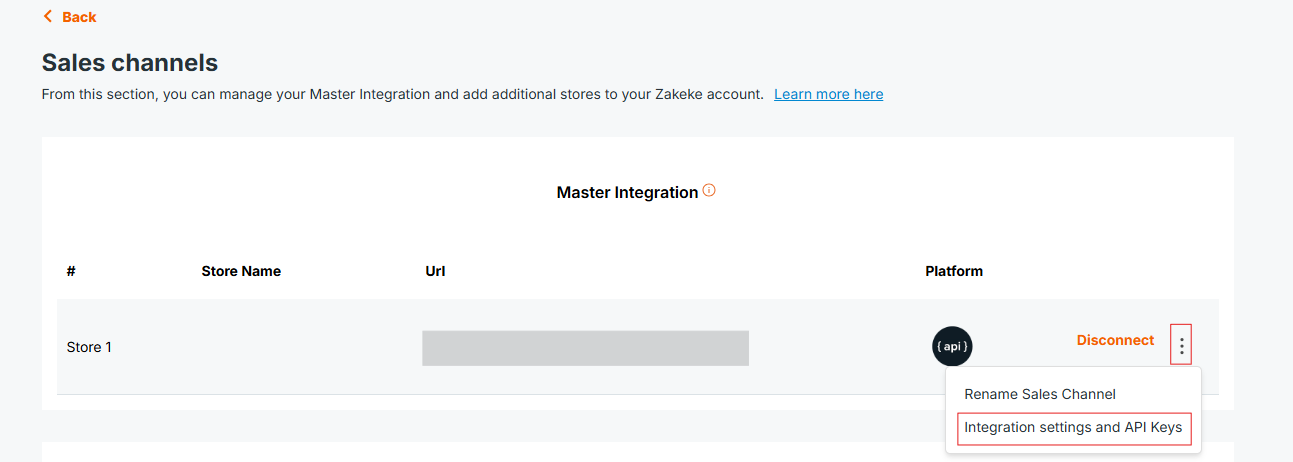
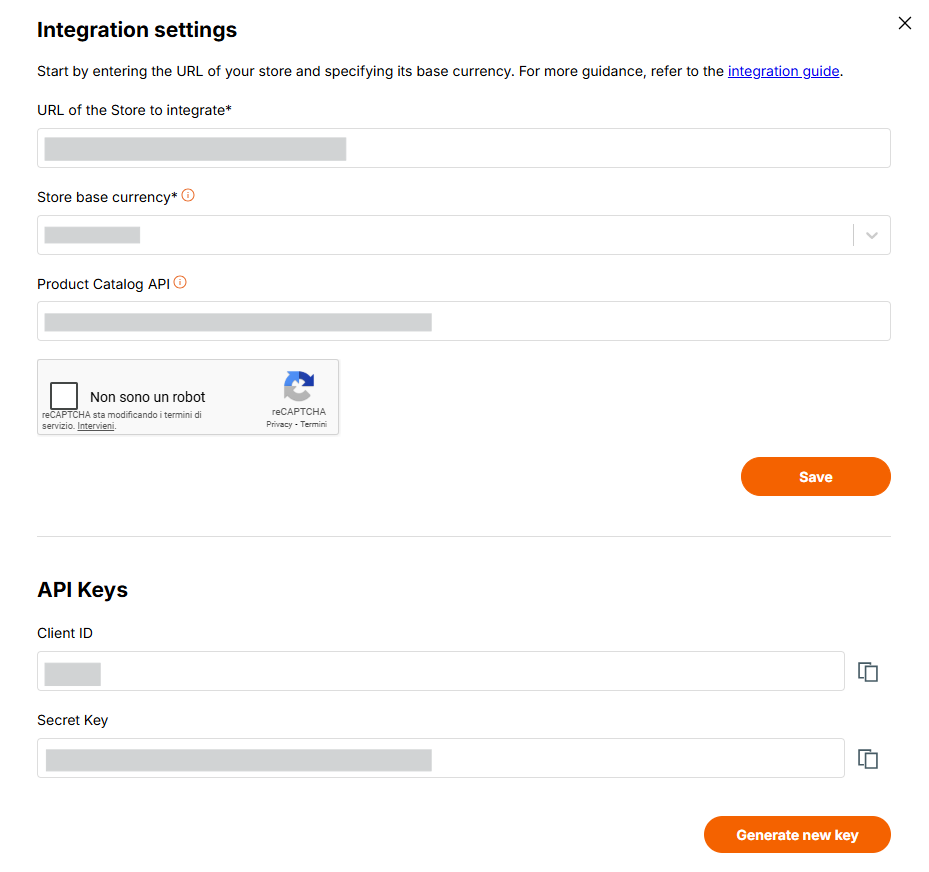
In the following documentation, we will assume that the base URL for your system's Product Catalog APIs is as follows:
https://yourSystem/yourProductsAPI/
Ensure that the endpoint includes the trailing slash (/) to prevent potential routing issues
2.6 Required Endpoints
The following table lists all the endpoints to be implemented on your system that are required for the Product Catalog API, distinguishing the use cases for the Visual Product Customizer and the 3D Product Configurator.
Both Visual Product Customizer and 3D Product Configurator:
| Verb | Endpoint | Description |
|---|---|---|
| GET | https://yourSystem/yourProductsAPI/ | Retrieves a list of products. Attributes page Return a specific page of results (default: 1).search Filter results by product name or code. |
| GET | https://yourSystem/yourProductsAPI/{product_code}/options | Retrieves the list of options for the product with the code {product_code}. |
Visual Product Customizer:
| Verb | Endpoint | Description |
|---|---|---|
| POST | https://yourSystem/yourProductsAPI/{product_code}/customizer | Marks the product as customizable in your System. |
| DELETE | https://yourSystem/yourProductsAPI/{product_code}/customizer | Marks the product as not longer customizable in your system |
3D Product Configurator:
| Verb | Endpoint | Description |
|---|---|---|
| POST | https://yourSystem/yourProductsAPI/{product_code}/configurator | Marks the product as configurable in your System. |
| DELETE | https://yourSystem/yourProductsAPI/{product_code}/configurator | Marks the product as not longer configurable in your system |
3 Examples
3.1 Retrieve all products
The following API calls retrieve all the products and obtain the second page of the result set.
Request
GET https://yourSystem/yourProductsAPI?page=2
Response
HTTP/1.1 200 OK
[
   {
      "code":"1343242",
      "name":"Woman handbag",
      "thumbnail":"https://imageUrl/woman_handbag.png"
   },
   {
      "code":"1343243",
      "name":"Watch",
      "thumbnail":"https://imageUrl/watch.png"
   }
]
3.2 Search for products
The following API calls retrieve all the products having the word "shirt" in the name and obtain the first page of the result set.
Request
GET https://yourSystem/yourProductsAPI?page=1&search=shirt
Response
HTTP/1.1 200 OK
[
   {
      "code":"fu1234sh",
      "name":"Long sleeve t-shirt",
      "thumbnail":"https://imageUrl/long-sleeve-tshirt.png"
   },
   {
      "code":"c14002af",
      "name":"Crew neck t-shirt",
      "thumbnail":"https://imageUrl/crew-neck-tshirt.png"
   },
   {
      "code":"c14002af",
      "name":"V-neck t-shirt",
      "thumbnail":"https://imageUrl/v-neck-tshirt.png"
   }
]
3.3 Retrieve product options
The following API calls retrieve the options of the product having code "1343242".
Request
GET https://yourSystem/yourProductsAPI/1343242/options
Response
HTTP/1.1 200 OK
[
   {
      "code":"34523",
      "name":"Color",
      "values": [
         {
            "code": "537564567",
            "name": "White"
         },
         {
            "code": "646456464",
            "name": "Black"
         }
      ]
   }
]
3.4 Mark a product as customizable
The following API call mark the product with code "1343242" as configurable with Zakeke.
Request
POST https://yourSystem/yourProductsAPI/1343242/customizer
Response
HTTP/1.1 200 OK
3.5 Mark a product as no longer customizable
The following API call mark the product with code "1343242" as configurable with Zakeke.
Request
DELETE https://yourSystem/yourProductsAPI/1343242/customizer
Response
HTTP/1.1 200 OK